
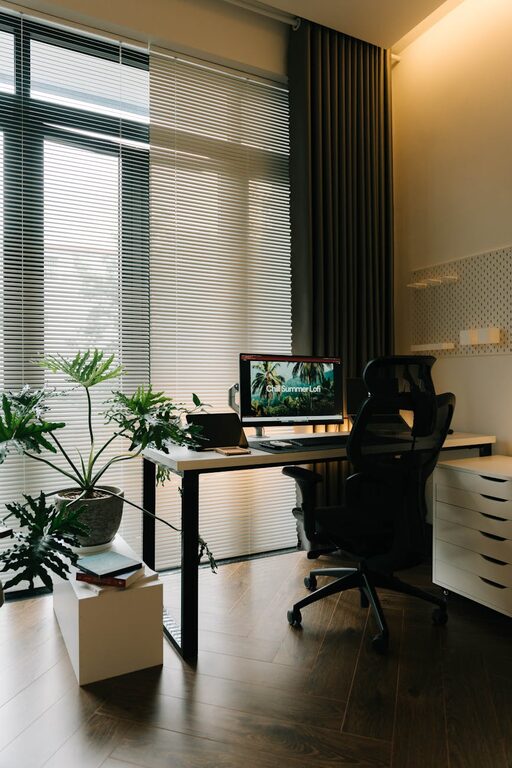
Working from home has become a common part of many people’s lives, making a well-designed home office more important than ever. Creating a space that is both cozy and productive helps you stay focused and comfortable throughout the day. Whether you have a dedicated room or just a small corner, there are simple ways to enhance your workspace without a major renovation.
In this post, we’ll explore practical tips to help you build a home office environment that supports your work and well-being.
Choose the Right Location
Selecting the best spot for your home office sets the foundation. Ideally, choose a quiet area with minimal distractions. This could be a spare room, a nook in the living area, or even a section of your bedroom. If possible, pick a place near a window to enjoy natural light, which can boost mood and reduce eye strain.
Consider Your Commute to Your Desk
Even at home, the feeling of “starting work” helps set the tone. Having a dedicated office space you can physically approach helps your brain switch into work mode.
Invest in Comfortable Furniture
Comfort is key when you spend hours at your desk.
– Ergonomic Chair: A supportive chair with adjustable height, lumbar support, and comfortable cushioning helps prevent back pain.
– Desk: Choose a desk large enough for your computer, documents, and other essentials. Adjustable desks that allow sitting and standing can be a great choice.
– Footrest and Accessories: These can improve your posture and overall comfort.
Taking care of your body supports long-term productivity.
Optimize Lighting
Good lighting reduces eye strain and helps you stay alert.
– Natural Light: Position your desk near a window when possible.
– Task Lighting: A desk lamp with adjustable brightness focuses light where you need it most.
– Ambient Lighting: Soft overhead lights or floor lamps create a warm atmosphere, balancing the brightness.
Avoid glare on your computer screen by adjusting blinds or lamp positions.
Organize Your Space
Clutter can be distracting and stressful. Keeping your workspace tidy helps you focus.
– Use Storage Solutions: Drawers, shelves, and organizers help keep supplies in order.
– Cable Management: Use clips or cable sleeves to reduce tangled wires.
– Daily Declutter: Spend a few minutes at the end of each day tidying your desk.
When everything has its place, you’ll spend less time searching for items and more time working.
Personalize Your Workspace
Adding personal touches makes your office feel inviting.
– Plants: Small indoor plants improve air quality and add a splash of nature.
– Artwork or Photos: Display images that inspire or calm you.
– Comfort Items: A cozy blanket or a favorite mug can add warmth to your routine.
Personal items can create a cozy vibe without becoming distractions if kept balanced.
Manage Noise Levels
Noise can disrupt concentration. Find ways to control ambient sound:
– Noise-Cancelling Headphones: Ideal if your surroundings are noisy.
– Soft Furnishings: Rugs, curtains, and cushions help absorb sound.
– White Noise Machines: These devices play soothing background sounds that mask distracting noise.
Experiment with different methods to discover what works best for you.
Maintain Good Air Quality
Fresh air keeps you alert and comfortable.
– Ventilate the Room: Open windows regularly when weather permits.
– Use Air Purifiers: They help reduce allergens and dust.
– Green Plants: Some houseplants can improve air quality naturally.
A well-ventilated, fresh space supports productivity and well-being.
Set Boundaries
If your home office shares space with family or housemates, setting clear boundaries is important.
– Communicate Your Schedule: Let others know your work hours.
– Use Visual Cues: Closed doors or headphones signal when you shouldn’t be disturbed.
– Create Transition Rituals: At the start and end of your workday, use rituals like turning on or off your desk lamp to separate work time from personal time.
Clear boundaries help reduce interruptions and maintain work-life balance.
Keep Technology Up to Date
Reliable tech reduces frustration and improves efficiency.
– High-Speed Internet: Ensure your connection supports video calls and uploading/downloading large files.
– Functional Hardware: Use a good monitor, keyboard, and mouse suited to your needs.
– Backup Solutions: Regularly save work and use cloud services to protect against data loss.
Investing in technology tailored to your tasks helps sustain productivity.
Regular Breaks and Movement
Spending long periods seated can be harmful. Plan short breaks to stretch and move.
– Pomodoro Technique: Work for 25 minutes and then take a 5-minute break.
– Standing Breaks: Use standing desks or simply stand up during breaks.
– Simple Exercises: Stretch your neck, arms, and legs to reduce tension.
Movement refreshes your mind and body, enhancing focus and creativity.
—
Creating a cozy and productive home office is about blending function and comfort. By choosing the right location, organizing effectively, and adding personal touches, your workspace can become a place you look forward to spending time in. Prioritize your comfort and well-being—it’s an investment in better workdays ahead.
